

The Departments module is used to create and manage departments that are used across all sites within the organization.
Departments can be updated or assigned to job positions to support accurate scheduling, reporting, and labor rule configuration.

Departments Settings
Key Features:
View Departments
The grid displays all existing departments with columns:
-
- Department Name
- External ID
- Actions (Edit, Delete)
Add Department
Clicking the Add button opens a popup where the user can:
-
- Enter Department Name (mandatory)
- Enter External ID (optional, used for third-party integration)
- Assign one or more Positions to the department
- Use Add All / Remove All to quickly map positions
- Save the department by clicking Add
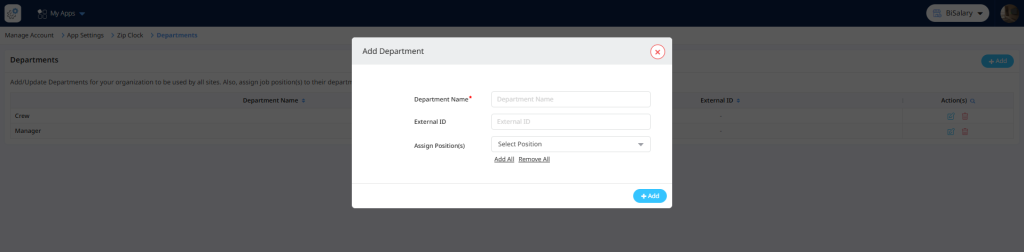
Add department Setting
Edit Department
By clicking the Edit icon, the same popup opens in edit mode where the user can:
-
- Modify the Department Name
- Update External ID
- Add or remove assigned Positions
- Click Update to save changes
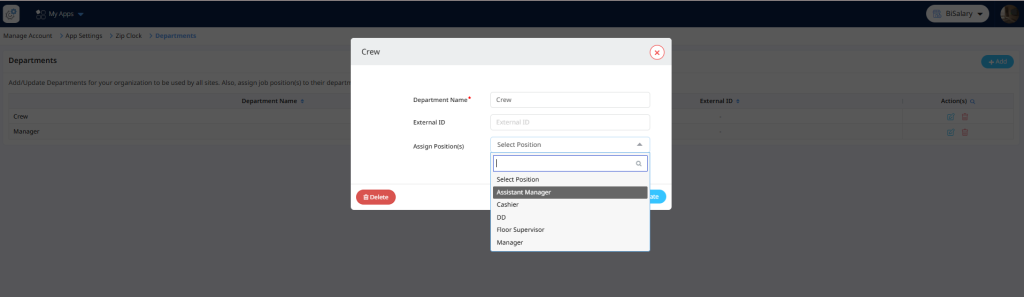
Edit department Setting
Delete Department
By clicking the Delete icon, the selected department can be removed after confirmation.